

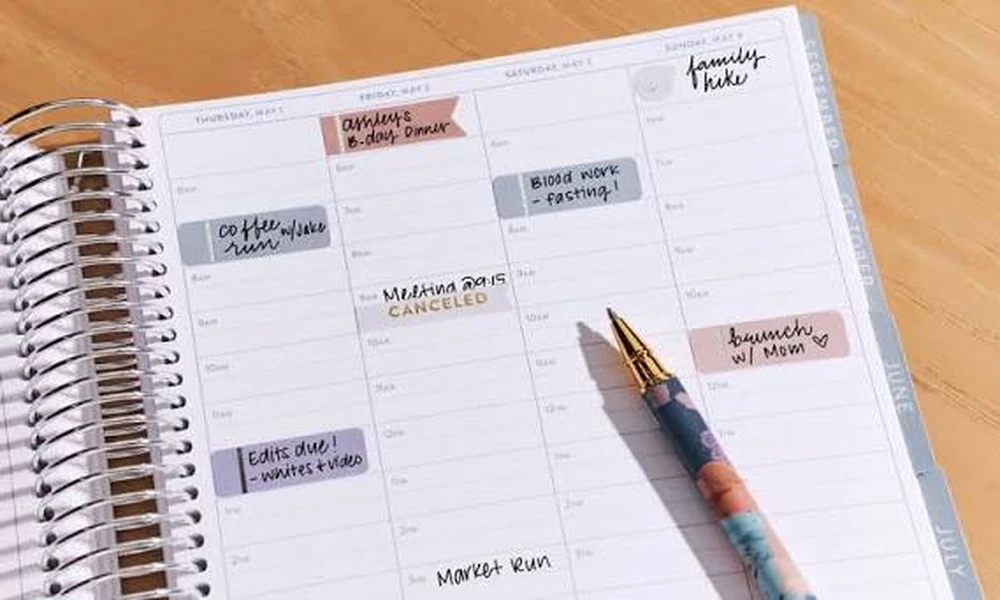
Most people set up their time blocks in a calendar app on Sunday night and feel completely in control. By Wednesday afternoon, those blocks have been quietly overwritten by meeting invites, drag-and-drop rescheduling, and three different notification badges. The plan is still technically there. The follow-through is gone. The problem isn’t the method. It’s the medium.
Time blocking is one of the most well-supported planning techniques around, and it works best when the tool you use creates friction, not convenience. That’s the counterintuitive truth that paper planners have quietly proven for decades, and it’s the argument this article is going to make as plainly as possible.
What Time Blocking Actually Demands From a Planning Tool
Time blocking, at its core, is a pre-commitment strategy. You decide in advance when you’ll do a specific task, you assign it a named slot, and then you protect that slot. The research on why this works points to a mechanism called implementation intentions: pairing a task with a specific time and context makes you dramatically more likely to complete it.
The tool that supports this best is not necessarily the most feature-rich one. It’s the one that makes your commitments visible, permanent-feeling, and hard to quietly dissolve with a two-second drag. A paper weekly layout does exactly that. Writing “deep work: proposal draft, 9-11am” in ink on Tuesday morning creates a different psychological contract than dropping a color-coded block into Google Calendar where it can vanish with a click.
Stanford University’s Center for Teaching and Learning recommends deliberately leaving buffer space in a weekly time-blocked plan and aligning harder tasks with personal energy peaks. That kind of intentional, whole-week thinking is exactly what a physical weekly layout is designed for. You can see the entire week on one spread and spot the imbalances before Tuesday blindsides you.
The Notification Problem Is Worse Than You Think
Here’s a number worth sitting with: according to DemandSage’s 2026 screen time report, the average person spends 6 hours and 51 minutes on their screen every single day. That’s nearly 48 hours a week. Your digital planner lives inside that same screen ecosystem, which means every “quick” check on your schedule is a potential 20-minute detour into email, Slack, or social media.
A paper weekly planner doesn’t have a notification badge. It doesn’t auto-suggest a meeting reschedule. It doesn’t remind you that someone reacted to your message. You open it, you see your week, you close it. That’s the entire interaction. For someone trying to protect deep work time, that is not a limitation. That’s the whole point.
The “Anchor-Flex-Reflect” framework is a practical way to think about how paper and digital tools can actually work together without letting digital scheduling eat your focus blocks. The idea is simple:
- Anchor your non-negotiable time blocks in your paper weekly planner every Sunday. These are your deep work sessions, creative windows, and high-priority tasks. They get ink first, before any digital calendar event exists.
- Flex your digital calendar around those anchors. Meetings, calls, and logistics can live in the app. They work around what you’ve already protected, not the other way around.
- Reflect on Friday afternoon by reviewing your paper plan. Did the blocks hold? Which ones got eaten? That weekly review takes four minutes and gives you data you can actually use.
This isn’t anti-technology. It’s recognizing that different tools serve different cognitive jobs, and that the planning tool you write in sets a harder boundary than the one you type in.
Your Brain Treats a Written Commitment Differently
The neuroscience here is worth knowing without overstating it. A study published in Frontiers in Behavioral Neuroscience found that participants who recorded appointments in a paper notebook showed higher accuracy on recall tasks and demonstrated deeper cognitive processing than those using tablets or smartphones. The paper group also completed their entries faster, suggesting the act of writing physically engages the brain in a more deliberate way.
What this means for time blocking specifically: when you write a task into a weekly block with a pen, your brain is not just logging information. It’s processing and encoding it. That increases the odds you’ll actually remember what you committed to, and it increases the sense of accountability that makes you less likely to skip it.
Contrast that with typing a task title into a calendar app. The cognitive load is minimal. The encoding is shallow. The commitment feels provisional. And when Friday arrives, you genuinely can’t remember which tasks you set versus which ones the app auto-populated from an email.
The Weekly View Is the Right Unit of Focus
Daily planning is too narrow. Monthly planning is too abstract. The week is the natural planning unit for most professional and personal lives, and a weekly paper layout makes that visible in a way no app quite replicates.
Picture a Monday morning. You open a physical weekly spread. You see five days of named blocks, already set. Your writing is right there in your own hand. You can feel which days are overloaded at a glance because one column is crammed and another is nearly empty. That spatial, whole-week view is something app interfaces approximate but never quite match. The week-on-a-page layout forces you to confront your own scheduling decisions rather than scroll past them.
This is where weekly planners for productivity like those from Franklin Planner earn their reputation. The format isn’t coincidental. Decades of research into goal achievement and behavioral follow-through informed why the weekly view became the dominant physical planning format in the first place.
A Quick Comparison: Paper vs. Digital for Time Blocking
| Factor | Paper Weekly Planner | Digital Calendar App |
|---|---|---|
| Commitment permanence | High (ink on page) | Low (drag-and-drop editable) |
| Distraction risk during use | None | High (notifications, links, apps) |
| Whole-week visibility | Immediate, spatial | Requires scrolling or zooming |
| Cognitive encoding of tasks | Deeper (motor-linked) | Shallow (minimal keystroke) |
| Meeting auto-scheduling | Not applicable | Can overwrite your focus blocks |
| Weekly review friction | Low (flip to last week) | Medium (navigate back, load events) |
How to Actually Start This Week
You don’t need a complicated system. Four steps, done on Sunday for fifteen minutes, is enough to get a full week of time blocking onto paper:
- Write your three most important deliverables for the week at the top of the page before you touch the daily blocks.
- Slot those deliverables into your two or three highest-energy windows across the week. Morning blocks, if that’s when you’re sharpest.
- Add meetings and commitments you already know about. See immediately which days are overloaded.
- Leave at least one open buffer block per day. Unexpected things will fill it, and you’ll feel like a planning genius rather than someone already behind.
That’s the whole system. The paper does the rest by keeping it visible, fixed, and yours.
The Bigger Picture
Digital tools are excellent at storing information, sending reminders, and syncing across devices. No argument there. But storing a plan and committing to a plan are two different cognitive events. The medium shapes the behavior.
If your time blocking keeps getting derailed despite the app, the app probably isn’t the problem. Try moving your weekly structure to paper for four weeks and watch what changes. You might find the most productive tool in your office was the analog one you stopped using.
